
Every tonne and its grade, from pit to ship.
See the tonnes and grade on every mine and port stockpile, the loads on the road between them and what's gone over the ship's rail. Each balance is worked out from the movements on and off the pile, so it always matches the paperwork.
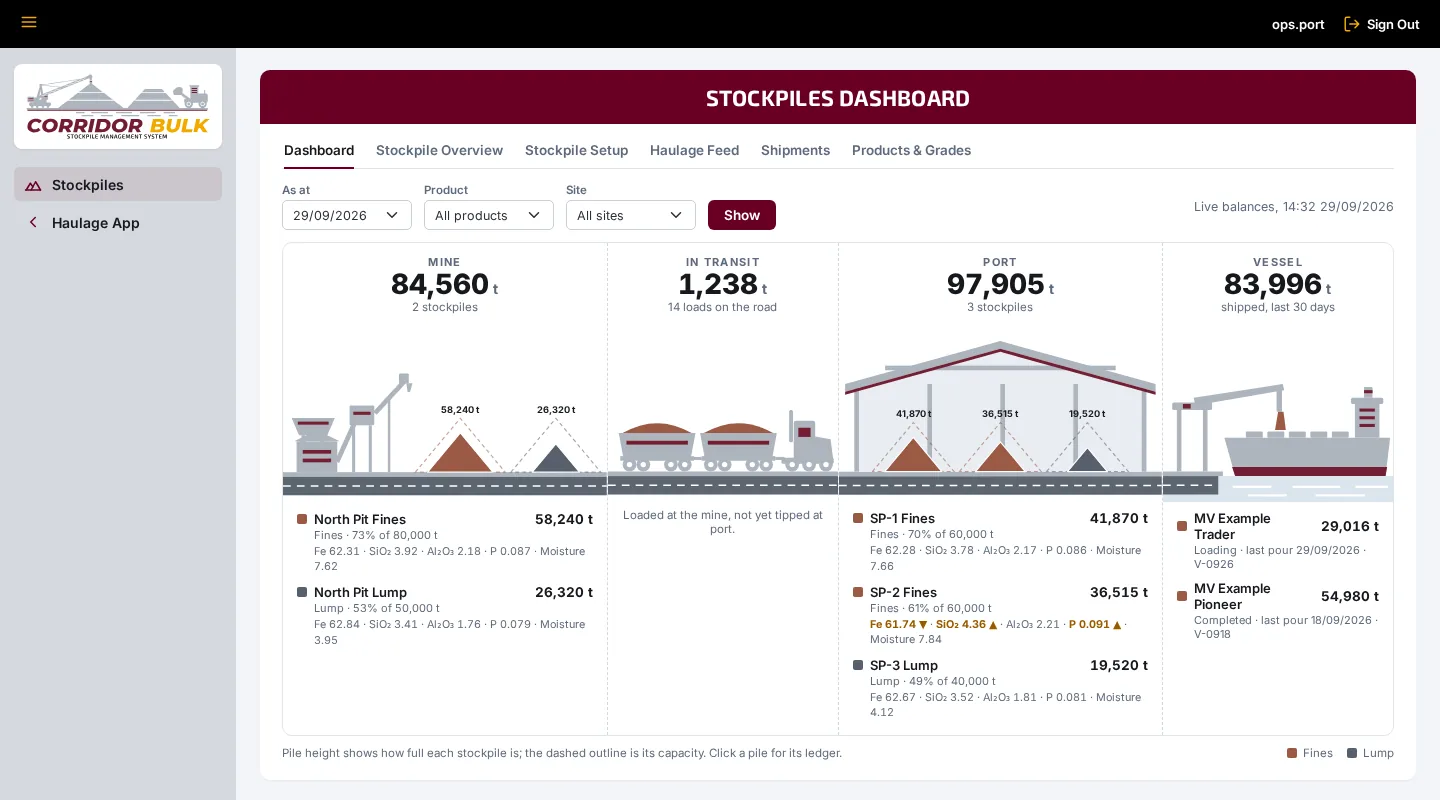
Four places the tonnes can be, on one screen.
The dashboard follows the product from the mine to the vessel. Filter it by product or site, or look back to the end of any day.
Mine stockpiles
Production, surveys and adjustments go on each pile, and haulage loads come off it as they're loaded.
On the road
Loads that have left the mine but haven't tipped, worked out from the dockets rather than kept as a pile anyone can adjust.
Port stockpiles
Tipped loads land on the live tip stockpile for that period, with one bay per product live at once if you need it.
Shipped
Tonnes loaded to each vessel, pour by pour, drawn from the port stockpiles they came off.
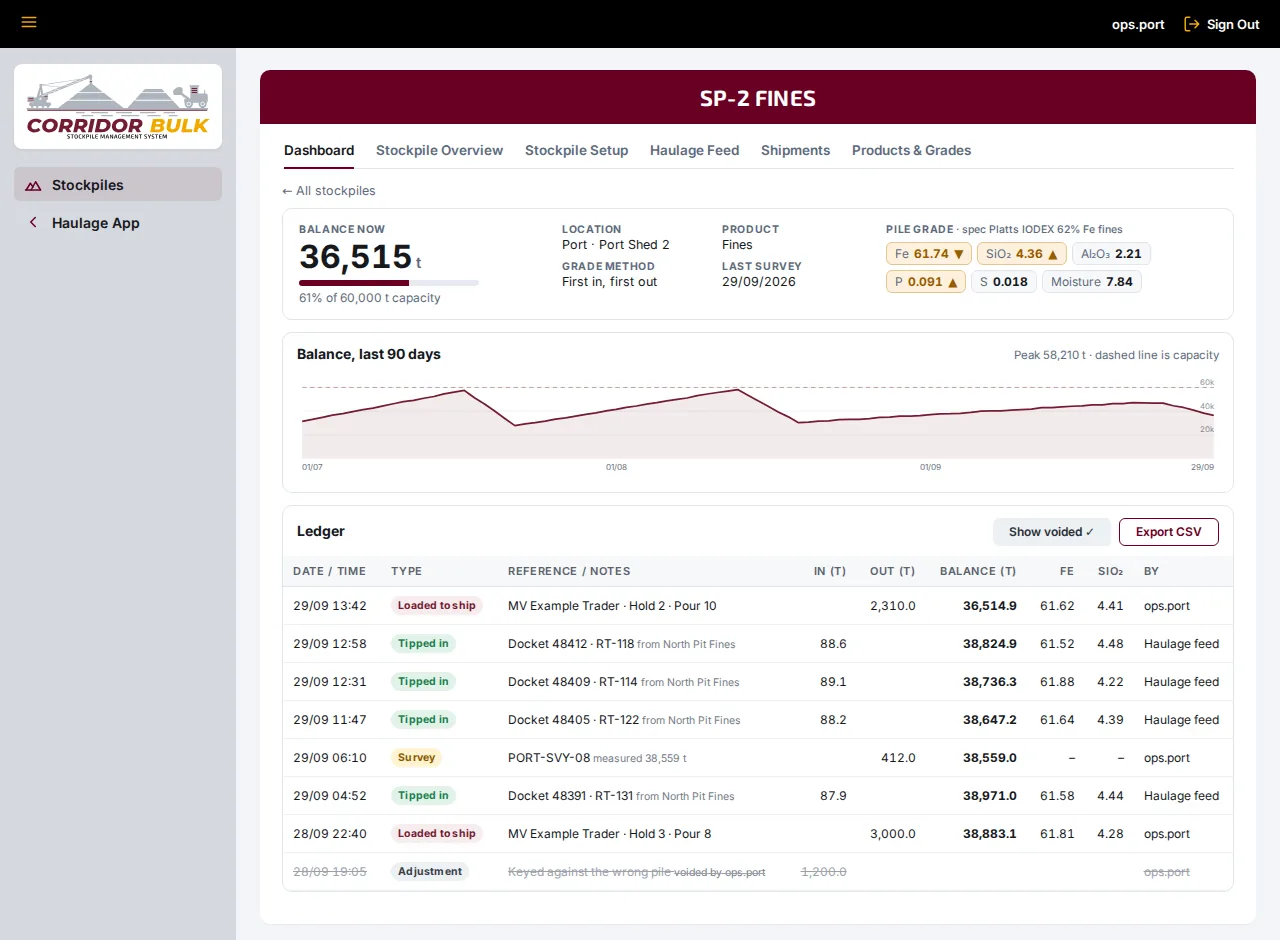
Every tonne on the ledger.
A stockpile's balance is only ever the sum of its ledger, never a figure someone typed over. Production, surveys, adjustments, tipped loads and ship pours each post a row, with the name of whoever entered it.
- A survey posts the difference to the book balance, and works it out again if a late entry lands before it
- Nothing is deleted: a wrong entry is voided with who voided it and why, and stays on the ledger
- A pile that goes negative is flagged, because an entry is almost always missing
- A 90-day balance chart for every pile, and ledgers that export to CSV
The grade follows the tonnes.
Set the grade properties each product carries and its spec. Grades entered with production and assays are carried through every movement, so each pile, load and shipment has a grade, and an off-spec pile is flagged.
- Fe, SiO₂, Al₂O₃, P, S, moisture, LOI and Mn to start with, or add your own
- A spec for each product, with the Platts IODEX 62% Fe fines basis a click away
- Tonnes that were never assayed don't dilute the average
- Enter a late docket and every grade after it is worked out again
- Switch grades off for a product and it's tracked in tonnes only
First in, first out
The oldest tonnes leave first, at the grade they went on with.
Last in, first out
The newest tonnes leave first.
Weighted average
Every tonne in is blended into the pile, and everything leaves at its average grade.
Fed by the dockets, not by hand.
Run it with the Haulage Operating System and every counted load moves its own tonnes: off its mine stockpile when it's loaded, and onto the port stockpile when it tips.
- Mine stockpiles come straight from the haulage stockpile register, so nothing is keyed twice
- Nominate the live tip stockpile for each period, with one bay per product live at the same time
- Loads on the road show as in transit until they tip
- A load that can't be placed is listed for someone to assign, never quietly dropped
- Counting starts from the day of your opening surveys, so old dockets don't drain the piles
Docket 48412 · RT-118
88.6 t of Fines
Loaded 10:17 · North Pit
North Pit Fines−88.6 t
Hauled out at the grade it left the pile with: Fe 61.52
10:17 to 12:58
In transit88.6 t
Counted on the road until it tips
Tipped 12:58 · Port
SP-2 Fines+88.6 t
Tipped in at the live tip stockpile, with the same grade
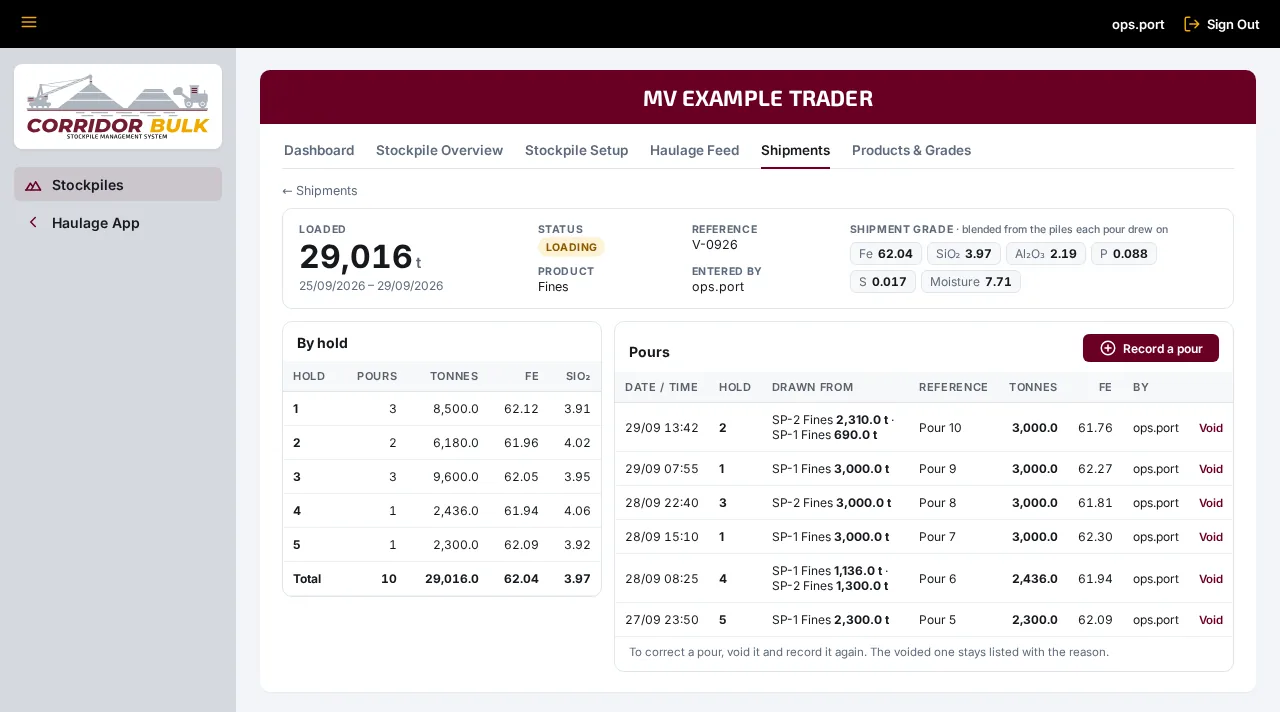
Every pour, from the piles it came off.
Record each vessel's pours hold by hold. A pour can draw from more than one stockpile, and the shipment's grade is blended from the piles each pour came off.
- Tonnes and grade by hold, and every pour with the stockpiles it drew from
- A warning when a pour takes more than a pile held
- Voiding a pour puts its tonnes back on the stockpiles, and the voided pour stays listed
- Shipped tonnes and vessels on the dashboard
Set up once, then left to run.
Stockpile setup
Name, location, product, site, capacity and grade method for each pile. Piles linked to the haulage register follow it automatically.
Access by area
Read access to see the dashboard and ledgers, write access to record movements and change the setup. Every entry records who made it.
With haulage or on its own
Open it from the Haulage Operating System or run it as a separate app on its own address. Either way it's the same sign-in and permissions.
Put a number on every stockpile.
We'll walk you through the dashboard, the ledgers and the grades using stockpiles and products like yours.