Pit-to-port operations software

From truck docket to ship's rail.

Corridor Bulk runs bulk haulage, stockpiles and shiploading on one platform. Compliance, e-dockets from the cab, contractor pay, stockpile tonnes and grades, and live loading against plan are each captured once, where the work happens.

Three modules, one platform
  • Haulage Operating System
  • Stockpile Management System
  • Loading & Discharge System
  • Run one or all three, for mining and agricultural bulk
Mine stockpiles, a road train hauling to a port stockpile, and a bulk carrier loading at the berthKM 0 · PITKM 55KM 110KM 165 · PORTBERTH 2 · MV EXAMPLE TRADER

The same load, followed through Corridor Bulk: it is loaded from the North Pit Fines stockpile, which holds 58,240 tonnes at 62.31 per cent iron; the driver and truck are cleared to load, docket 48213 is logged at 88.42 tonnes with a photo, the load is tipped at stockpile SP-2 and reconciled to the loader run sheet, and the vessel is 62 per cent loaded with a projected finish of 22:28.

The problem

Bulk operations still run on paper, phone calls and spreadsheets.

The same tonne can be written down four or five times between the loader and the ship. Every copy is a chance for the numbers to drift, and someone has to reconcile them at month end.

AreaTodayWith Corridor Bulk

Compliance

Licences, inductions and insurances tracked in spreadsheets and inboxes. Lapses surface in an audit, or after an incident.

Every requirement for every contractor, driver, truck and trailer, with expiry warnings 30 days out and a breach recorded when a lapsed requirement is used.

Dockets

Paper dockets collected at the end of the week and re-keyed in the office.

Drivers log each load on their phone with a photo of the docket, and the office checks the entry against the photo.

Contractors

Subcontractors email their paperwork, phone the office to ask what they hauled, and query their RCTI on pay day.

Each contractor logs in to their own view of the same records to upload documents, check their loads and approve their RCTIs.

Invoicing

Contractor RCTIs built in one spreadsheet and customer invoices in another. The numbers rarely match at month end, and payments stall while they're chased.

RCTIs for contractors and tax invoices for customers are raised from the same loads, reconciled every day, so both sides agree before month end.

Stockpiles

Stockpile tonnes and grades kept in a spreadsheet, updated when someone gets to it and corrected at the next survey.

Every pile's balance and grade worked out from the loads on and off it, with each survey reconciled against the book.

Shiploading

Progress relayed by radio and phone. The finish time is a best guess.

The plan and every pour in one live view, with a projected finish worked out from the achieved rate.

The platform

Three modules, built to work together.

Start with the module that fits your operation. Each one runs on its own, and they're designed to connect as your operation grows.

Compliance, dockets, reconciliation and contractor pay for road haulage fleets and the principals who contract them.

  • Compliance matrices, approvals and breach tracking
  • A driver app for loads, fuel, hazards and documents
  • Contractor Access: each contractor's own login to their fleet and loads
  • Docket review and loader run sheet reconciliation
  • RCTIs for contractors and tax invoices for customers, from the same loads
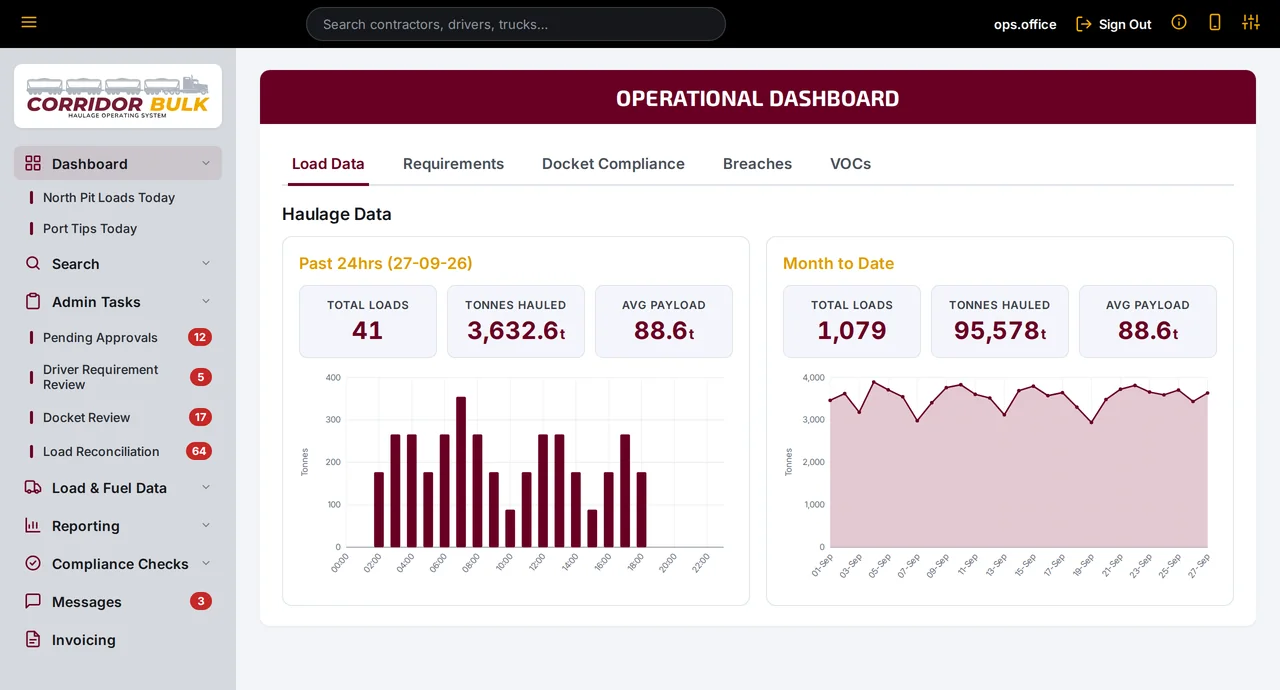
Corridor Bulk operational dashboard showing loads, tonnes hauled and average payload for the past 24 hours and month to date
Explore haulage

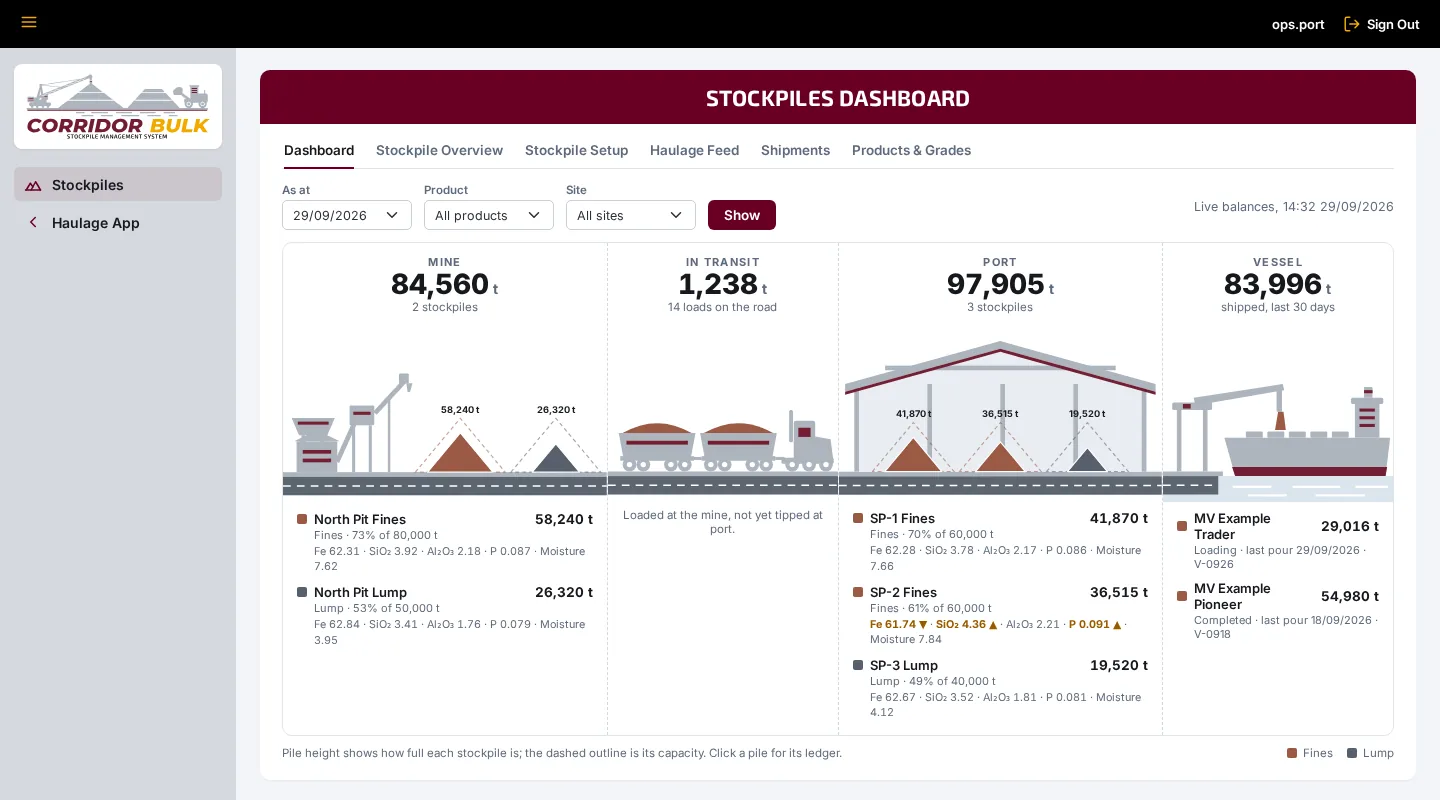
Tonnes and grades on every mine and port stockpile, the loads on the road between them and what's gone to the ship.

  • Mine, in transit, port and shipped, live or as at any date
  • A ledger for every pile, with surveys reconciled against the book
  • Grades carried through each draw-down, and off-spec piles flagged
  • Haulage dockets posted onto the piles automatically
  • Shipments recorded by hold, from the piles they drew on
Corridor Bulk stockpiles dashboard showing tonnes at the mine, in transit, at port and shipped, with each stockpile drawn to how full it is
Explore stockpiles

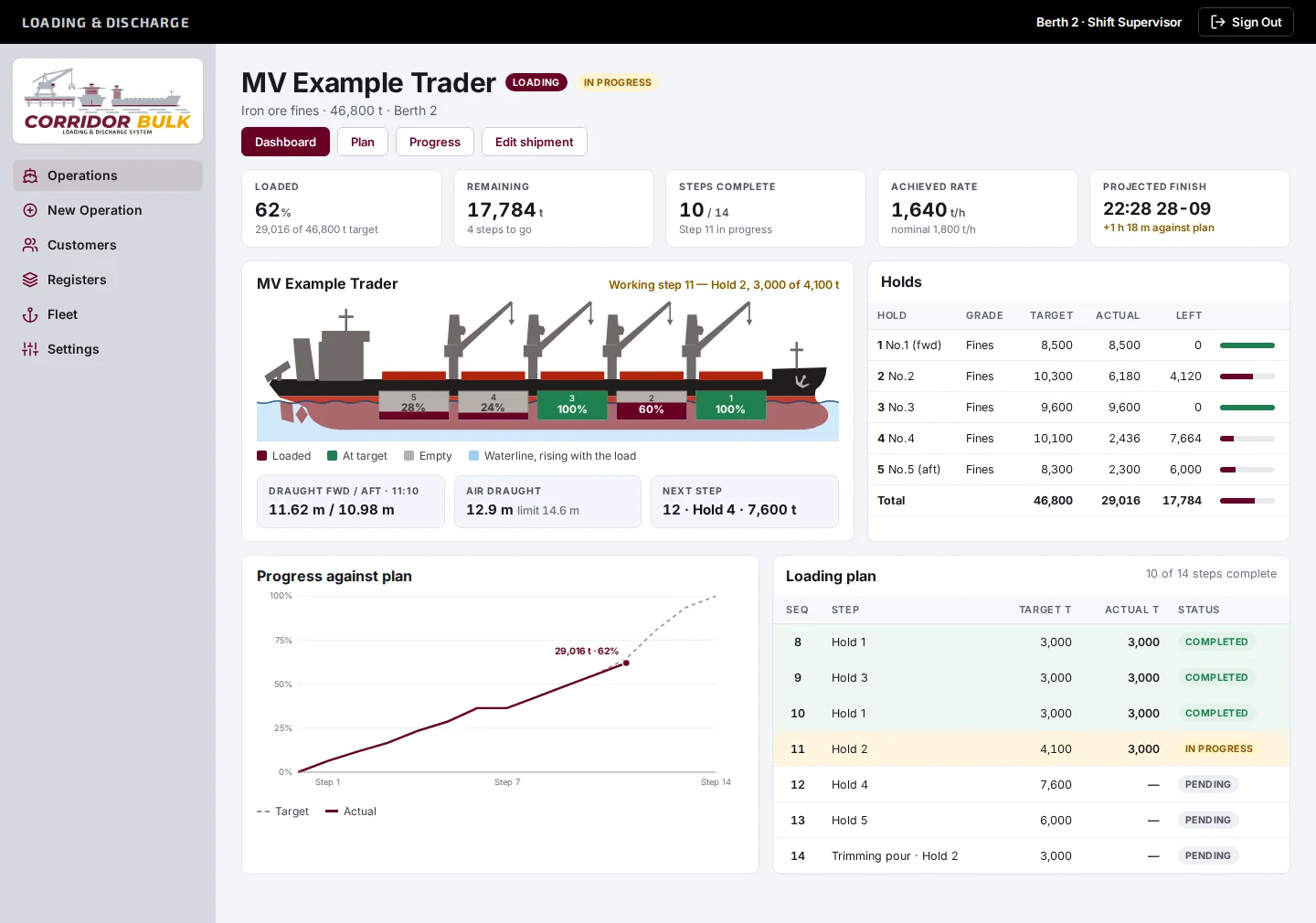
Loading and discharge plans worked pour by pour, with one live view of progress for everyone involved in the vessel call.

  • Vessel register with 5, 7 and 9-hold templates
  • Plan steps for pours, trims, surveys, shifts and stops
  • Actual tonnes, times and draughts recorded per step
  • Plan checks for overloads, hold rates and air draught
  • A live dashboard with projected finish
Corridor Bulk loading dashboard with a bulk carrier side profile, holds filled to their share of target, and a projected finish time
Explore shiploading
Contractor Access

Every contractor gets their own login.

Contractors see the same records as your office, filtered to their own trucks, drivers and loads. They clear outstanding requirements, check what they've hauled, approve RCTIs and run their own reports without calling the office.

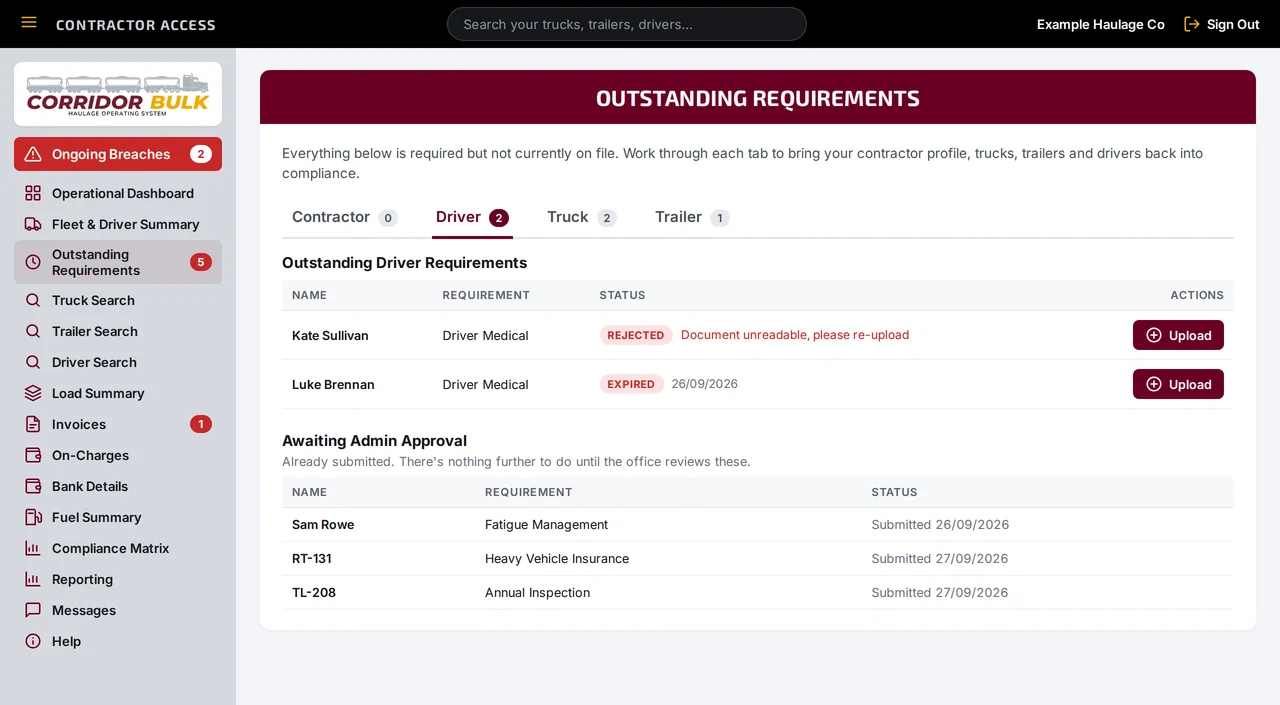
  • Outstanding requirements for their business, drivers, trucks and trailers, each with an upload button
  • Any ongoing breach is the first thing they see until it's cleared
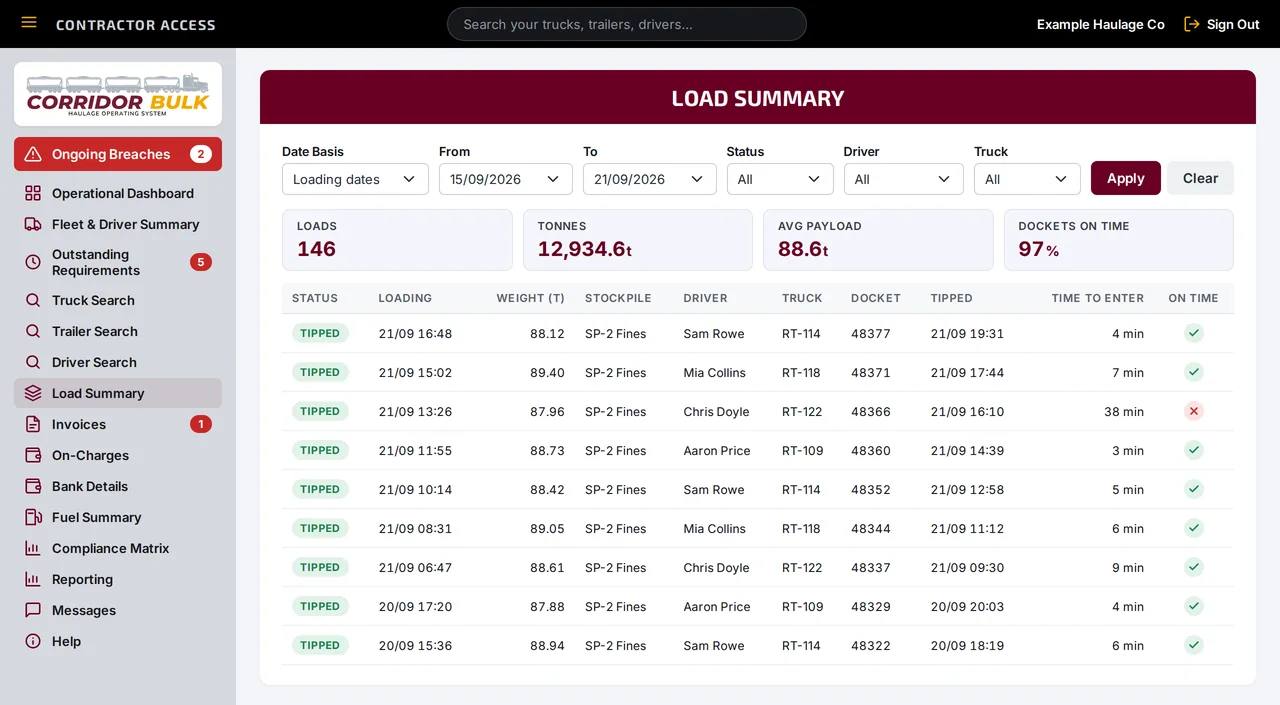
  • Every load their trucks hauled, with filters and totals
  • RCTIs to approve or dispute, and on-charges listed before they're deducted
  • Their own dashboard and compliance reports
Contractor Access for Example Haulage Co, open on Outstanding Requirements: two driver documents to upload and three items awaiting office approval
Contractor Access for one contractor: their outstanding requirements, with their Load Summary behind. Nobody else's drivers, trucks or loads appear.
How a load moves

Captured once, where the work happens.

Follow one load from the loader to the ship. Each step builds on the record made before it, so nobody types the same numbers twice, and the dashboards and reports update as it goes.

  1. 01

    At the gate

    Cleared before they roll

    Contractors, drivers, trucks and trailers carry their requirements. Contractors and drivers upload their own documents, and the office approves them and tracks them to expiry.

  2. 02

    In the cab

    Docket captured at the source

    The driver logs the load on their phone: route, truck, stockpile, loader, weight and a photo of the docket.

  3. 03

    At the stockpiles

    Off one pile, onto the next

    Loading takes the tonnes off the mine stockpile and tipping puts them on the port stockpile, carrying their grade. In between, they show as in transit.

  4. 04

    In the office

    Checked against the photo

    Docket Review shows the photo beside the entry. Loads are matched to the loader's run sheet and missing dockets are chased.

  5. 05

    At pay time

    Contractors paid, customers invoiced

    The same reconciled loads produce an RCTI for each contractor to approve in Contractor Access, and a claim and tax invoice for the customer.

  6. 06

    At the berth

    Loaded to plan

    The loading plan is worked pour by pour, with hold-by-hold progress and a projected finish everyone can see.

Who it's for

Built for everyone on the corridor.

Haulage contractors

Keep drivers and trucks compliant, get dockets in the same day, and give each subcontractor a login to their own loads and RCTIs.

Mine owners and principals

See every contractor's compliance position, check claims against the loads actually hauled, and know what's on every stockpile.

Ports, terminals and stevedores

Track port stockpiles, work loading and discharge plans live, and give agents, surveyors, shippers and receivers the same view.

Transhippers

Track the ocean-going vessel's load hold by hold against the agreed plan, one delivery at a time.

See how each one uses Corridor Bulk

About

Built in Perth, from the operation up.

Corridor Bulk is developed by Blue Ring Group, a Perth-based mining logistics business. The haulage system was built alongside a working bulk haulage operation in Western Australia and runs on real loads every day.

Built to be trusted with the paperwork

  • Your own instance

    Each customer runs on a separate instance and database, with their own logo, colours and sign-in page.

  • Access by area

    Permissions are set per area as none, read or write. Two-factor sign-in and an audit log record who changed what.

  • Evidence kept

    Invoices keep the rates, tonnages and details they were raised on. Approvals, rejections and edits are all logged.

See it working on an operation like yours.

Tell us what you haul, where it goes and how you run it today. We'll walk you through Corridor Bulk using an operation that looks like yours.

or email enquiries@corridorbulk.com.au